
pointcoral is a local, open-source R package for
CPCe/photoquadrat point-count workflows. It imports CPCe point
annotations, matches those points to source images, creates ecological
percent-cover tables, writes visual QC overlays, and exports
machine-learning-ready point labels, image-centered patches, sparse
masks, and train/validation/test splits. When you want richer labels, it
can also standardize raw short labels with a flexible crosswalk.
The package is designed for reef photoquadrat projects where the raw
CPCe labels are project-specific shorthand codes such as
SPO, CALG, PEYS,
LOBO, or S. Those raw labels are already
inside the .cpc files and are always preserved. You can run
a bare workflow directly from those labels. A crosswalk is the optional
bonus layer that maps them to full species or benthic type labels such
as Sponge, Coralline algae,
Peyssonnelia, Lobophora variegata, or
Sand, plus the ecological major classes and subclasses used
for analysis.
pointcoral does not depend on MERMAID,
mermaidr, CoralNet accounts, cloud APIs, Python, or any
closed platform. It is built to run fully on your own computer with your
own files.
The CPCe software and random point-count method are described in:
Kohler, K.E. and S.M. Gill (2006). “Coral Point Count with Excel extensions (CPCe): A Visual Basic program for the determination of coral and substrate coverage using random point count methodology.” Computers & Geosciences 32(9): 1259-1269. DOI: 10.1016/j.cageo.2005.11.009.
The package starts with CPCe files and reef images, then produces
clean tables, summary graphics, QC images, and ML-ready outputs. The
examples below are built from the two bundled sample .cpc
files and matching sample images included in this repository.
CPCe stores short codes. pointcoral keeps those short
codes but joins them to the full label and ecological class you define
in a crosswalk when you provide one.
| Raw CPCe label | Full label | Subclass | Major class | Class ID |
|---|---|---|---|---|
SPO |
Sponge | subcategory | SPONGES (S) | 2 |
CALG |
Coralline algae | subcategory | CORALLINE ALGAE (CA) | 7 |
PEYS |
Peyssonnelia | subcategory | PEYSSONNELIACEAE | 5 |
PEFL |
Peyssonnelia flavescens | subcategory | PEYSSONNELIACEAE | 5 |
LOBO |
Lobophora variegata | subcategory | MACROALGAE (MA) | 4 |
S |
Sand | subcategory | SAND, PAVEMENT, RUBBLE (SPR) | 8 |
P |
Pavement | subcategory | SAND, PAVEMENT, RUBBLE (SPR) | 8 |
AA |
Agaricia | subcategory | CORAL (C) | 0 |
SS |
Siderastrea siderea | subcategory | CORAL (C) | 0 |
Each CPCe point is converted into a row with image identity, pixel coordinates, and the original raw label. After the optional crosswalk step, the same table also includes full labels, ecological classes, and class IDs.
| Image | Point | x | y | Raw | Full label | Major class | Class ID |
|---|---|---|---|---|---|---|---|
| HIW_158_W_U-1 | 1 | 65 | 38 | SPO |
Sponge | SPONGES (S) | 2 |
| HIW_158_W_U-1 | 2 | 23 | 362 | S |
Sand | SAND, PAVEMENT, RUBBLE (SPR) | 8 |
| HIW_158_W_U-1 | 3 | 89 | 557 | CALG |
Coralline algae | CORALLINE ALGAE (CA) | 7 |
| HIW_158_W_U-1 | 4 | 233 | 682 | SPO |
Sponge | SPONGES (S) | 2 |
| HIW_158_W_U-1 | 7 | 8 | 1226 | PEYS |
Peyssonnelia | PEYSSONNELIACEAE | 5 |
| HIW_158_W_U-1 | 10 | 61 | 1827 | LOBO |
Lobophora variegata | MACROALGAE (MA) | 4 |
This figure summarizes the two bundled sample images after applying
the bundled example crosswalk. The numbers are still computed directly
from CPCe point counts. Without a crosswalk, the same summary functions
report percent cover by raw_label.
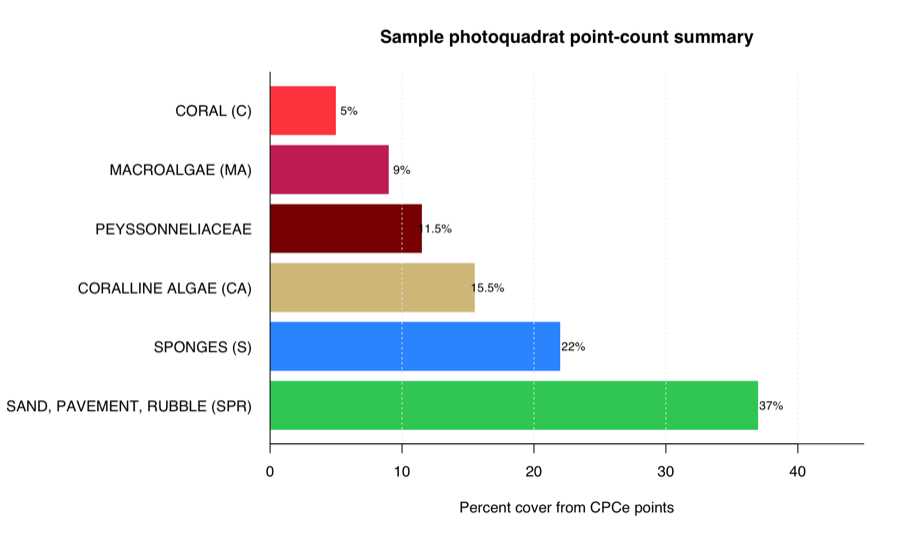
The same results are also written as CSV tables. For example, image-level output looks like this:
| Site | Image | Major class | Points | Total points | Percent |
|---|---|---|---|---|---|
| Hole in the Wall | HIW_158_W_U-1 | CORAL (C) | 5 | 100 | 5 |
| Hole in the Wall | HIW_158_W_U-1 | CORALLINE ALGAE (CA) | 18 | 100 | 18 |
| Hole in the Wall | HIW_158_W_U-1 | MACROALGAE (MA) | 11 | 100 | 11 |
| Hole in the Wall | HIW_158_W_U-1 | PEYSSONNELIACEAE | 16 | 100 | 16 |
| Hole in the Wall | HIW_158_W_U-1 | SAND, PAVEMENT, RUBBLE (SPR) | 23 | 100 | 23 |
| Hole in the Wall | HIW_158_W_U-1 | SPONGES (S) | 27 | 100 | 27 |
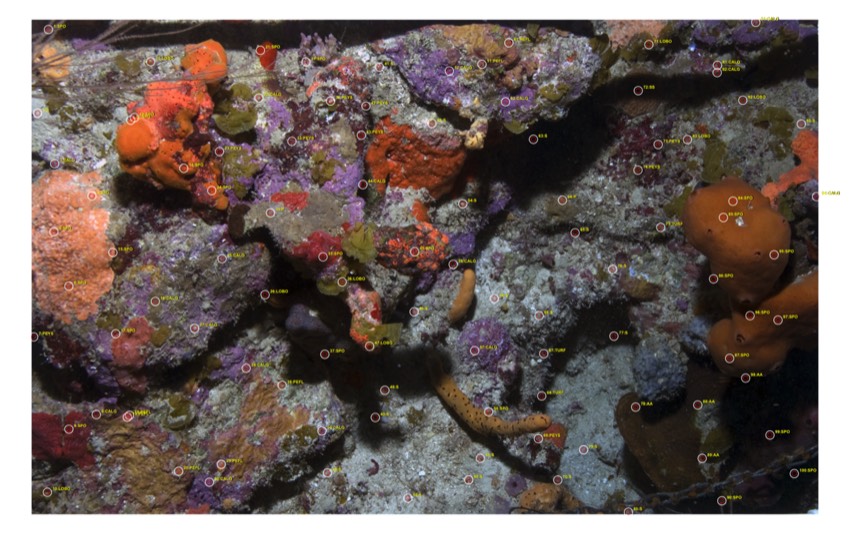
The package writes annotated images so you can inspect CPCe point placement and labels before trusting summaries or ML exports.
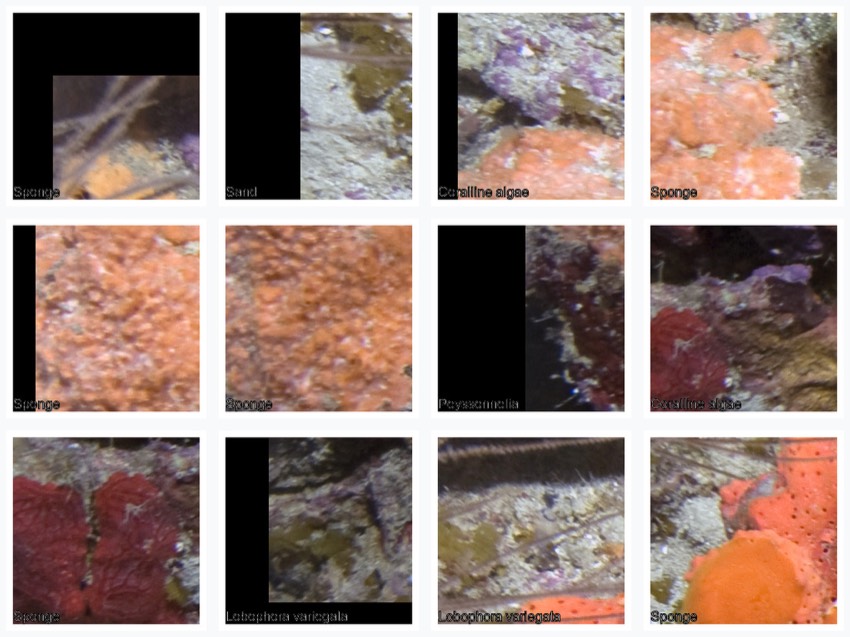
Each point can become an image-centered crop. These patches can be used for patch classification, active learning, review workflows, or as weak labels for model development.
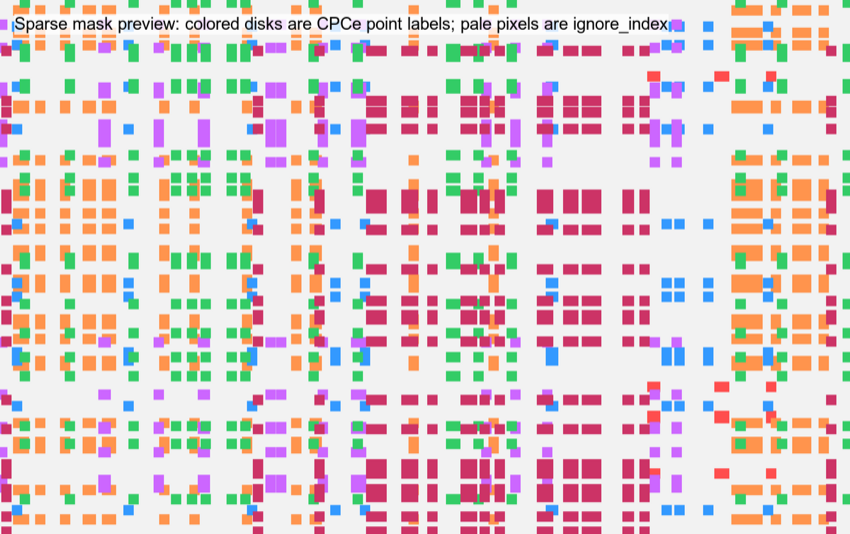
Sparse masks only label a small disk around each CPCe point. The pale
background is ignore_index, meaning it is not treated as a
dense annotation.
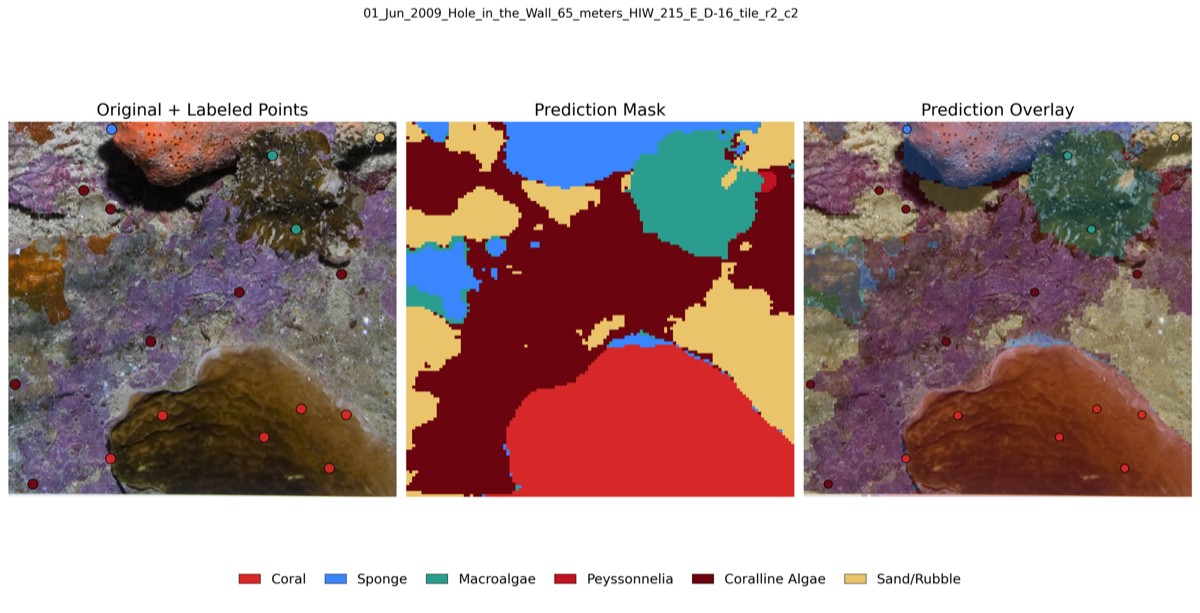
Pointcoral point tables can support downstream ML review products such as labeled point views, prediction masks, and prediction overlays.
Install from GitHub:
install.packages("remotes")
remotes::install_github("el-cordero/pointcoral")
Load the package:
library(pointcoral)At minimum you need:
.cpc files or CPCe-like point export tables.A simple project folder can look like this:
my_project/
  cpce/
    HIW_158_W_U-1.cpc
    H_211_E_U-1.cpc
  images/
    HIW_158_W_U-1.jpg
    H_211_E_U-1.jpg
  outputs/
The .cpc files and images may also live in the same
folder. Image matching is by basename, so HIW_158_W_U-1.cpc
matches HIW_158_W_U-1.jpg.
A crosswalk is optional. Add one when you want to translate raw CPCe labels into full labels, major ecological classes, subclasses, or project-specific ML classes:
my_project/
  labels/
my_crosswalk.csvThe package uses this distinction:
raw_code: the original CPCe short code.raw_label: also the original CPCe short code as it
appeared in the .cpc.full_label: the full species or benthic type name. This
usually comes from a crosswalk, not from the bare .cpc
point rows.clean_label: the standardized analysis label. By
default this is the same as full_label.label_class: an optional subclass/type field, such as
subcategory, artifact, or
disease_or_condition.major_category: the ecological major class, such as
CORAL (C), SPONGES (S),
PEYSSONNELIACEAE, or
SAND, PAVEMENT, RUBBLE (SPR).ml_class: the class label used for ML exports after
standardization. In a bare workflow, pointcoral uses
raw_label instead.class_id: integer ID for ML masks and class lookup
tables. If a crosswalk does not provide IDs, IDs are generated from the
label column being used.For example:
raw_code raw_label full_label                label_class major_category
SPO      SPO       Sponge                    subcategory SPONGES (S)
CALG     CALG      Coralline algae           subcategory CORALLINE ALGAE (CA)
PEFL     PEFL      Peyssonnelia flavescens   subcategory PEYSSONNELIACEAE
LOBO     LOBO      Lobophora variegata       subcategory MACROALGAE (MA)
S        S         Sand                      subcategory SAND, PAVEMENT, RUBBLE (SPR)
The bundled example crosswalk is a starting example, not a universal ontology. You do not need it for the bare workflow, but you should review it against your own CPCe codefile before using standardized classes for final analysis.
The package includes two small .cpc files and matching
JPEGs in inst/extdata.
library(pointcoral)
library(dplyr)

example_dir <- system.file("extdata", package = "pointcoral")

points_raw <- read_cpce_folder(
  path = example_dir,
  image_root = example_dir,
  recursive = FALSE
)

points_raw |>
  select(image_id, point_id, x_px, y_px, raw_label) |>
  head()
Bare example output:
image_id       point_id x_px y_px raw_label
HIW_158_W_U-1 1        65   38    SPO
HIW_158_W_U-1 2        23   362   S
HIW_158_W_U-1 3        89   557   CALG
You can summarize immediately by raw CPCe label:
summarize_images(points_raw)Then, as an optional standardization step, add the example crosswalk:
crosswalk_path <- system.file(
  "extdata",
  "pointcoral_example_crosswalk.csv",
  package = "pointcoral"
)

crosswalk <- read_label_crosswalk(crosswalk_path)
points_clean <- standardize_labels(points_raw, crosswalk)
points_clean |>
  select(image_id, point_id, x_px, y_px, raw_label, full_label,
         label_class, major_category, class_id) |>
  head()
Example output columns:
image_id       point_id x_px y_px raw_label full_label       major_category
HIW_158_W_U-1 1        65   38    SPO       Sponge           SPONGES (S)
HIW_158_W_U-1 2        23   362   S         Sand             SAND, PAVEMENT, RUBBLE (SPR)
HIW_158_W_U-1 3 89 557 CALG Coralline algae CORALLINE ALGAE (CA)Use run_pointcoral() when your goal is to import a
folder, write ecological tables, create ML labels, and optionally write
patches, sparse masks, and QC overlays. The bare call does not need a
crosswalk:
out_dir <- file.path(tempdir(), "pointcoral_outputs")

result <- run_pointcoral(
  cpce_dir = example_dir,
  image_root = example_dir,
  out_dir = out_dir,
  recursive = FALSE,
  patch_size = 224,
  make_patches = FALSE,
  make_masks = TRUE,
  make_qc = TRUE
)

result$validation_report
result$class_col
result$ml_points
When you want full labels and major classes, pass a crosswalk:
result_standardized <- run_pointcoral(
  cpce_dir = example_dir,
  image_root = example_dir,
  out_dir = file.path(tempdir(), "pointcoral_outputs_standardized"),
  crosswalk_path = crosswalk_path,
  recursive = FALSE,
  class_col = "ml_class",
  make_patches = FALSE,
  make_masks = TRUE,
  make_qc = TRUE
)

result_standardized$crosswalk_check
result_standardized$points_clean |>
  select(raw_label, full_label, major_category, class_id) |>
  head()
The output folder contains:
outputs/
  tables/
    points_raw.csv
    points_clean.csv
    image_summary.csv
    transect_summary.csv
    site_summary.csv
    class_lookup.csv
    validation_report.csv
    crosswalk_check.csv
  ml/
    labels.csv
    labels_train.csv
    labels_val.csv
    labels_test.csv
    class_lookup.csv
  patches/
    train/
    val/
    test/
  sparse_masks/
    masks/
    manifest.csv
  qc/
    overlays/
label_summary.csvcpc_file <- system.file("extdata", "HIW_158_W_U-1.cpc", package = "pointcoral")
points <- read_cpce_file(cpc_file)
nrow(points)
names(points)read_cpce_file() currently parses the text
.cpc structure used by the bundled sample files:
The parser is tested against the sample .cpc files in
this repository. Do not assume every possible CPCe export variant is
supported until you test it with your own files.
points <- read_cpce_folder(
  path = "my_project/cpce",
  image_root = "my_project/images",
  recursive = TRUE
)
read_cpce_folder() reads .cpc files and
attempts to read point-like CSV/TSV/XLS/XLSX exports. It skips obvious
crosswalk/lookup files so an extdata or project folder can
contain both data and a crosswalk.
_raw tabsSome CPCe output workbooks contain one raw worksheet per image, with
sheet names ending in _raw. Use
read_cpce_output_raw_tabs() when you want those raw
worksheet tables directly.
raw_tabs <- read_cpce_output_raw_tabs("my_project/cpce_output/Total Site.xlsx")

raw_tabs |>
  dplyr::select(image_name, point_index, raw_data, cpce_major_category, major_category) |>
  head()
The function:
_rawdeep_cres_ by default
because those use a different formatimage_name as the first column, based on the sheet
name without _rawpoint_index, a 1-based row index within each raw
sheet that preserves CPCe point order for later joins to
.cpc filescpce_major_categorymajor_category using the bundled example crosswalk
or your own crosswalkFor project-specific labels, pass your own crosswalk:
raw_tabs <- read_cpce_output_raw_tabs(
  "my_project/cpce_output/Total Site.xlsx",
  crosswalk = "my_project/labels/my_crosswalk.csv"
)points <- match_images(points, image_root = "my_project/images")This fills:
image_pathimage_widthimage_heightx_pxy_pxIf CPCe coordinates are in a different coordinate space than the actual image, the conversion is proportional:
converted <- convert_cpce_coords(
  points = tibble::tibble(cpce_x = 50, cpce_y = 25),
  cpce_width = 100,
  cpce_height = 50,
  image_width = 1000,
  image_height = 500
)
The original CPCe coordinates remain in cpce_x and
cpce_y.
The bare workflow starts here. The .cpc point rows
already contain labels, so you can validate, summarize, split, export ML
labels, and write QC overlays without a crosswalk.
validate_points(points)

summarize_images(points)
summarize_transects(points)
summarize_sites(points)

points_split <- split_ml_points(points, split_by = "image", seed = 1)
ml_points <- make_ml_points(points_split)
When major_category or ml_class are empty,
these functions automatically use raw_label. Generated
class IDs are assigned from the raw labels for ML CSVs and sparse
masks.
xwalk <- read_label_crosswalk("my_project/labels/my_crosswalk.csv")

glimpse(xwalk)
Recommended crosswalk columns:
raw_code
raw_label
full_label
clean_label
label_class
major_category
ml_class
class_id
include_in_analysis
include_in_ml
notes
The reader also recognizes common synonyms from existing crosswalk
tables, including label_clean, major_class,
and keep.
report <- check_crosswalk(points, xwalk)
report
This reports:
points_clean <- standardize_labels(
  points,
  xwalk,
  by = "raw_code",
  unknown_action = "warn"
)
Unknown-label behavior is explicit:
standardize_labels(points, xwalk, unknown_action = "warn")  # warn and keep
standardize_labels(points, xwalk, unknown_action = "keep")  # keep silently
standardize_labels(points, xwalk, unknown_action = "drop")  # warn and drop
standardize_labels(points, xwalk, unknown_action = "error") # stop
The package never silently drops unmapped labels.
validate_points(points_clean)Checks include:
Summarize by major class:
summarize_images(points_clean, class_col = "major_category")
summarize_transects(points_clean, class_col = "major_category")
summarize_sites(points_clean, class_col = "major_category")
Summarize by full species/type:
summarize_images(points_clean, class_col = "clean_label")Summarize by raw CPCe code:
summarize_images(points_clean, class_col = "raw_label")Use custom grouping:
summarize_points(
  points_clean,
  by = c("site", "transect", "survey_date"),
  class_col = "major_category"
)
Write summary tables:
write_summary_tables(
  points_clean,
  out_dir = "my_project/outputs/tables",
  class_cols = c("major_category", "clean_label", "ml_class")
)Bare CPCe labels:
ml_points <- make_ml_points(points_split)Standardized labels after a crosswalk:
ml_points <- make_ml_points(points_clean, class_col = "ml_class")

ml_points |>
  select(image_path, image_id, x_px, y_px, label, class_id, split,
         raw_label, full_label, major_category) |>
  head()
Split by image:
points_split <- split_ml_points(
  points_clean,
  split_by = "image",
  train = 0.70,
  val = 0.15,
  test = 0.15,
  seed = 1
)
Split by transect:
points_split <- split_ml_points(points_clean, split_by = "transect", seed = 1)Split by site:
points_split <- split_ml_points(points_clean, split_by = "site", seed = 1)Write ML CSV files:
ml_points <- make_ml_points(points_split)
write_ml_points_csv(ml_points, out_dir = "my_project/outputs/ml")patch_manifest <- extract_point_patches(
points_split,
image_root = "my_project/images",
out_dir = "my_project/outputs/patches",
patch_size = 224,
edge = "skip"
)Use edge = "pad" to keep points near image borders:
patch_manifest <- extract_point_patches(
  points_split,
  image_root = "my_project/images",
  out_dir = "my_project/outputs/patches_padded",
  patch_size = 224,
  edge = "pad"
)
Patch outputs are organized by split and class:
patches/
  train/
    CORAL_C/
    SPONGES_S/
  val/
  test/
patch_manifest.csvmask_manifest <- make_sparse_masks(
points_split,
image_root = "my_project/images",
out_dir = "my_project/outputs/sparse_masks",
radius = 3,
ignore_index = 255,
background_index = 0
)Sparse masks are weak labels. Only small disks around CPCe points
contain class IDs. All unlabeled pixels are ignore_index by
default. These are not dense human-annotated segmentation masks.
Local CoralNet-style point CSV:
export_coralnet_points(points_clean, out_dir = "my_project/outputs/coralnet")YOLO-style classification patches:
export_yolo_classification(
  points_split,
  image_root = "my_project/images",
  out_dir = "my_project/outputs/yolo_patches",
  patch_size = 224
)
SegFormer-style sparse masks:
export_segformer_sparse(
  points_split,
  image_root = "my_project/images",
  out_dir = "my_project/outputs/segformer_sparse",
  radius = 3
)one_image <- unique(points_clean$image_path)[1]
one_points <- points_clean[points_clean$image_path == one_image, ]
overlay <- plot_points_on_image(
image_path = one_image,
points = one_points,
point_size = 8
)
overlayoverlay_manifest <- write_qc_overlays(
points_clean,
image_root = "my_project/images",
out_dir = "my_project/outputs/qc"
)Try different label columns:
write_qc_overlays(points_clean, "my_project/images", "qc_raw", label_col = "raw_label")
write_qc_overlays(points_clean, "my_project/images", "qc_major", label_col = "major_category")
write_qc_overlays(points_clean, "my_project/images", "qc_ml", label_col = "ml_class")qc_label_summary(points_clean, label_col = "ml_class")This helps identify unmapped labels, rare classes, duplicate points, and class balance.
A minimal crosswalk can join on raw labels only:
my_xwalk <- tibble::tribble(
  ~raw_label, ~full_label, ~clean_label, ~label_class, ~major_category, ~ml_class, ~class_id,
  "SPO", "Sponge", "Sponge", "subcategory", "SPONGES (S)", "SPONGES (S)", 2,
  "S", "Sand", "Sand", "subcategory", "SAND, PAVEMENT, RUBBLE (SPR)", "SAND, PAVEMENT, RUBBLE (SPR)", 8,
  "CALG", "Coralline algae", "Coralline algae", "subcategory", "CORALLINE ALGAE (CA)", "CORALLINE ALGAE (CA)", 7
)

points_clean <- standardize_labels(points, my_xwalk, by = "raw_label")
You can also join on different column names:
my_xwalk <- tibble::tribble(
  ~cpce_code, ~species_or_type, ~major_class,
  "SPO", "Sponge", "SPONGES (S)",
  "S", "Sand", "SAND, PAVEMENT, RUBBLE (SPR)"
)

my_xwalk <- read_label_crosswalk("my_crosswalk.csv")

points_clean <- standardize_labels(
  points,
  my_xwalk,
  by = c(raw_code = "raw_code")
)
Use a different ML class scheme from your ecological scheme:
xwalk <- read_label_crosswalk("my_project/labels/my_crosswalk.csv")

xwalk$ml_class <- dplyr::case_when(
  xwalk$major_category == "CORAL (C)" ~ "live_coral",
  xwalk$major_category %in% c("SPONGES (S)", "GORGONIANS (G)", "ZOANTHIDS (Z)") ~ "other_live",
  xwalk$major_category == "SAND, PAVEMENT, RUBBLE (SPR)" ~ "substrate",
  TRUE ~ "other"
)

xwalk$class_id <- match(xwalk$ml_class, sort(unique(xwalk$ml_class))) - 1L
points_clean <- standardize_labels(points, xwalk)Tested now:
.cpc files matching the bundled sample
structure._raw..cpc basenames.Planned or project-specific formats that need representative test fixtures before the package should claim full support:
Where available, pointcoral returns:
project_id
site
transect
survey_date
image_id
image_file
image_path
point_id
cpce_x
cpce_y
cpce_width
cpce_height
image_width
image_height
x_px
y_px
raw_code
raw_label
full_label
clean_label
label_class
major_category
ml_class
class_id
reviewer
notes
Extra source columns are preserved.
.cpc file imports but image paths are missingUse match_images() with the folder containing your real
local images:
points <- match_images(points, image_root = "path/to/images")CPCe files often contain old Windows image paths. pointcoral uses basename matching so local macOS/Linux paths can still work.
Write QC overlays:
write_qc_overlays(points_clean, image_root = "images", out_dir = "qc")The current tested conversion is proportional scaling from CPCe ROI coordinate space to image pixels. If your project used a different CPCe geometry configuration, inspect overlays before trusting summaries or ML exports.
Run:
check_crosswalk(points, xwalk)Then add the missing raw_label/raw_code
rows to your crosswalk. Do not use the bundled example blindly for final
ecological analysis.
Use the lower-level functions:
points <- read_cpce_folder("cpce", image_root = "images")
xwalk <- read_label_crosswalk("crosswalk.csv")
points_clean <- standardize_labels(points, xwalk)
write_summary_tables(points_clean, out_dir = "outputs/tables")points <- read_cpce_folder("cpce", image_root = "images")
xwalk <- read_label_crosswalk("crosswalk.csv")
points_clean <- standardize_labels(points, xwalk)
points_split <- split_ml_points(points_clean, split_by = "image")
ml_points <- make_ml_points(points_split, class_col = "ml_class")
write_ml_points_csv(ml_points, "outputs/ml")
extract_point_patches(points_split, "images", "outputs/patches")The package author/maintainer is Elvin Cordero elvin.cordero@seamountgeo.com.